自然言語でサイト内検索機能を作りたかった
いくつか方法はありそうだが、ひとまずgoogleのgen ai SDKを用いてgoogle検索でgroundingしたものを作ってみた
自然言語検索のボタンをtop画面に設置した。無料のプロジェクトにしているのでいくら検索されても料金はかからないはず
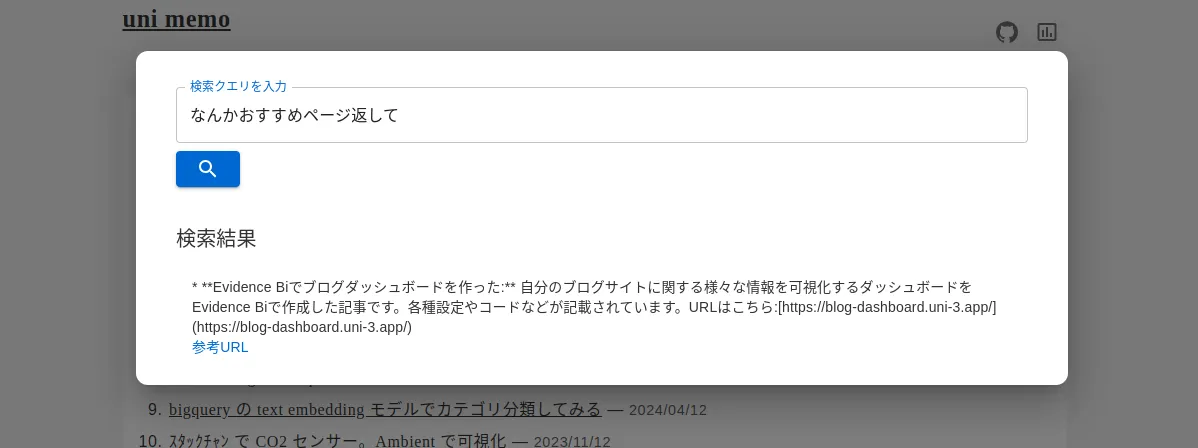
画面は以下の感じ。今どきっぽいモーダルな検索画面。ちなみに精度(狙った挙動をしてくれる確率)はとても低い。適用方法としてはよくないのだろう
2025/06/18 追記
検索結果の返り値UI(HTML)を表示しないといけないという規約ができていたため、検索機能は削除した。このへんはgoogleカスタム検索と同じか
When you use grounding with Google Search, and you receive Search suggestions in your response, you must display the Search suggestions in production and in your applications. For more information on grounding with Google Search, see Grounding with Google Search documentation for Google AI Studio or Vertex AI. The UI code (HTML) is returned in the Gemini response as renderedContent, and you will need to show the HTML in your app, in accordance with the policy.
https://google.github.io/adk-docs/tools/built-in-tools/#google-search
返り値としては以下のような、responseと、検索ワードが返ってくる。これらをユーザーに表示する用途とするのみ、としているみたい
- response取得
from google import genai
from google.genai import types
client = genai.Client(api_key='gemini_api_key')
# Define the grounding tool
grounding_tool = types.Tool(
google_search=types.GoogleSearch()
)
# Configure generation settings
config = types.GenerateContentConfig(
tools=[grounding_tool]
)
# Make the request
response = client.models.generate_content(
model="gemini-2.5-flash",
contents="普段の生活で使えるネイルのデザインについて紹介して",
config=config,
)- 検索結果の参考URL付きテキスト取得
def add_citations(response):
text = response.text
supports = response.candidates[0].grounding_metadata.grounding_supports
chunks = response.candidates[0].grounding_metadata.grounding_chunks
# Sort supports by end_index in descending order to avoid shifting issues when inserting.
sorted_supports = sorted(supports, key=lambda s: s.segment.end_index, reverse=True)
for support in sorted_supports:
end_index = support.segment.end_index
if support.grounding_chunk_indices:
# Create citation string like [1](link1)[2](link2)
citation_links = []
for i in support.grounding_chunk_indices:
if i < len(chunks):
uri = chunks[i].web.uri
citation_links.append(f"[{i + 1}]({uri})")
citation_string = ", ".join(citation_links)
text = text[:end_index] + citation_string + text[end_index:]
return text
text_with_citations = add_citations(response)
print(text_with_citations)テキスト長いので折りたたむ。URLはリダイレクトURLが発行される
text_with_citations
日常生活で気軽に楽しめるネイルデザインは、シンプルさや肌馴染みの良いカラーがポイントです。オフィスシーンからプライベートまで幅広く使えるデザインが多くあります。
**普段使いにおすすめのネイルデザイン**
* **ワンカラーネイル**
シンプルながらも色の美しさや艶感が際立ち、大人世代にも人気です。肌馴染みの良い乳白色、ベージュ、ピンクベージュ、グレージュなどが特におすすめです。清潔感があり、オフィスでも許容されやすいです。少し濃い色でも、パーツが付いていないシンプルなデザインであれば清潔感があり許容される場合があります。
* **グラデーションネイル**
爪の根元から先端に向かって徐々に色が濃くなるデザインで、シンプルながら華やかさがあります。ピンクやベージュなどの肌に馴染む色で施せば、オフィスでも目立ちにくく、指を長く見せる効果も期待できます。
* **フレンチネイル**
定番のフレンチネイルは上品で清潔感があります。特に、フレンチラインを細くした「スキニーフレンチ」は、シンプルなデザインなのでオフィスシーンにもぴったりです。
* **ニュアンスネイル**
じゅわっとにじんだようなデザインやくすみ系カラーを使ったデザインがおしゃれで、トレンド感も出せます。グラデーションやマーブル模様を取り入れることで、個性的なスタイルを楽しめます。
* **チークネイル**
爪の中央にだけ色をのせるチークのようなデザインで、ふんわりとした血色感を与え、可愛らしい印象になります。
* **マグネットネイル**
繊細なラメが美しく、ワンカラーでも華やかな印象になります。シアー感のある色味を選ぶときれいめに仕上がり、グラデーションと組み合わせるのもおすすめ[1](https://vertexaisearch.cloud.google.com/grounding-api-redirect/AUZIYQFm3AQ95aiUP8Hohiwsr28hPUVJe5gu6xjIPWj3Bh1EToqA8wtUipkRCEP6H6Ef8IVMSwFxVGhnkEFbPIuIgJOK3dLGe1NNoUhfKEOAsdaDHfB2wgk9x_NbBG1ig_vVZEbVcP91), [2](https://vertexaisearch.cloud.google.com/grounding-api-redirect/AUZIYQErg-XAP2xRyPp2baowRoncY4fB2Bc7r3jopvopvDxjZed0j4OyIrOlyZRdZ9TnNFCHtKnUMymPK9bmZvd2FCwB6OZrs5a7ni1PLI_5xrW17SBwOBuXw2_RRwqyhYY1JA7OhT-YqWjPVjc8IZ4l8fc0CZKBkPMdE68=), [3](https://vertexaisearch.cloud.google.com/grounding-api-redirect/AUZIYQGu_jwIkIQdVqwz1YKv9kmF_FDXnQU8VZowJ3VUU_VJffdHqxUTVLkvgB4SJsmaRoSrHOFXxwqA3isNVQXr8c9khRPrCeumEUdoxC5bk9p3ZvCLuRZq65_s8TWCRIKCiSK20Q==), [4](https://vertexaisearch.cloud.google.com/grounding-api-redirect/AUZIYQHGVnC2FtqEmDJRTF6iFKgmmWjXrYRe-CPbtVe1JOBBnSdn7uQ_EBYANxk4CU6IOPpox9xFPKneeMiHSsKMJObAnYW_q_-2p_vkMyxvy1VHdcAtyU0pXk-w-AjO8Hdb0l7iQqiVO_4lBSMcPNv8-hcKOqvOIIY8dQ==)です。
* **クリアネイル**
透明感があり、清潔感のある印象を与えます。
**デザインにプラスする工夫**
* **ラメやパール、ラインストーン**
シンプルネイルに物足りなさを感じる場合は、パールやラインストーン、スタッズなどのパーツを最小限にのせたり、ラメグラデーションを取り入れたりすることで、上品な華やかさをプラスできます。
* **ぷっくりアート**
ベースは肌馴染みの良いスキントーンを選び、クリアジェルでぷっくりとしたモチーフアートを重ねると可愛らしい印象になります。
* **大理石ネイル**
繊細な模様が目を惹く大理石風アートも、ニュアンス感のある色使いでトレンド感のある仕上がりになります。
[5](https://vertexaisearch.cloud.google.com/grounding-api-redirect/AUZIYQFC52bpP5v2a53DFXFHNctneGkEz_MW7Law-MCUIcMwyjDPQ_THWlsDReL2inO74z7Hs6dhTik7Ywg7_FsQS-InS-PqYSAuzb3mq38Onrgmk-UBwDlV96X9fxm5z9w5wI3l-NaAEGeMKAMhks6b), [3](https://vertexaisearch.cloud.google.com/grounding-api-redirect/AUZIYQGu_jwIkIQdVqwz1YKv9kmF_FDXnQU8VZowJ3VUU_VJffdHqxUTVLkvgB4SJsmaRoSrHOFXxwqA3isNVQXr8c9khRPrCeumEUdoxC5bk9p3ZvCLuRZq65_s8TWCRIKCiSK20Q==)これらのデザインは、オフィスからプライベートまで様々なシーンで活躍し、指先を美しく見せてくれます。[1](https://vertexaisearch.cloud.google.com/grounding-api-redirect/AUZIYQFm3AQ95aiUP8Hohiwsr28hPUVJe5gu6xjIPWj3Bh1EToqA8wtUipkRCEP6H6Ef8IVMSwFxVGhnkEFbPIuIgJOK3dLGe1NNoUhfKEOAsdaDHfB2wgk9x_NbBG1ig_vVZEbVcP91), [9](https:/[1](https://vertexaisearch.cloud.google.com/grounding-api-redirect/AUZIYQFm3AQ95aiUP8Hohiwsr28hPUVJe5gu6xjIPWj3Bh1EToqA8wtUipkRCEP6H6Ef8IVMSwFxVGhnkEFbPIuIgJOK3dLGe1NNoUhfKEOAsdaDHfB2wgk9x_NbBG1ig_vVZEbVcP91), [6](https://vertexaisearch.cloud.google.com/grounding-api-redirect/AUZIYQENj1J0p2KySeYI3N3ye6ZPIN0P_-3lKgLaKMFFvOmKseiz6mRkpgxiupvI-MOEwwqqUrmf7RfsgCS1-uPDnCo1E_KPryfgAsvxZBAwPQvlTy_lyN51O-7XreIe2SEh3R1toOQPSMz10qK7k3r6Kbg4)/vertexaisearch.cloud.google.com/grounding-api-redirect/AUZIYQHLNiHh7YPd_Idw2O4VacKxzOV00zom7AeN84Eu0K3-FBdVaI6Mi_ybAbZhFUUQqyFaXLcWpKJNyA5kqSC_jj2LasybJw-er3LuHP-DlIYai6M67Dehq4hoqnTZ3uwWGmM5eUXoTP6vmQe3SvNpoA==)[1](https://vertexaisearch.cloud.google.com/grounding-api-redirect/AUZIYQFm3AQ95aiUP8Hohiwsr2[1](https://vertexaisearch.cloud.google.com/grounding-api-redirect/AUZIYQFm3AQ95aiUP8Hohiwsr28hPUVJe5gu6xjIPWj3Bh1EToqA8wtUipkRCEP6H6Ef8IVMSwFxVGhnkEFbPIuIgJOK3dLGe1NNoUhfKEOAsdaDHfB2wgk9x_NbBG1ig_vVZEbVcP91), [7](https://vertexaisearch.cloud.google.com/grounding-api-redirect/AUZIYQGQSAIYRB0rNcaxdY0PEo6g2XL5cPd-VXKisTPYJSzDC9uvPolfjJRHjBg16oBbnlwy2IfEWat-31KmvHBoxhs8CZmLJco6hUrRxVWNWpcFYyU81XSvkRW0H0mcWdP8lPLzpusyOCSd59wIyAly7Guyq9GHSSWWo42gznaky-RYtg==), [6](https://vertexaisearch.cloud.google.com/grounding-api-redirect/AUZIYQENj1J0p2KySeYI3N3ye6ZPIN0P_-3lKgLaKMFFvOmKseiz6mRkpgxiupvI-MOEwwqqUrmf7RfsgCS1-uPDnCo1E_KPryfgAsvxZBAwPQvlTy_lyN51O-7XreIe2SEh3R1toOQPSMz10qK7k3r6Kbg4)8hPUVJe5gu6xjIPWj3Bh1EToqA8wtUipkRCEP6H6Ef8IVMSwFxVGhnkEFbPIuIgJOK3dLGe1NNoUhfKEOAsdaDHfB2wgk9x_NbBG1ig_vVZEbVcP91)[1](https://vertexaisearch.cloud.google.com/grounding-api-redirect/AUZIYQF[1](https://vertexaisearch.cloud.google.com/grounding-api-redirect/AUZIYQFm3AQ95aiUP8Hohiwsr28hPUVJe5gu6xjIPWj3Bh1EToqA8wtUipkRCEP6H6Ef8IVMSwFxVGhnkEFbPIuIgJOK3dLGe1NNoUhfKEOAsdaDHfB2wgk9x_NbBG1ig_vVZEbVcP91)m3AQ95aiUP8Hohiwsr28hPUVJe5gu6xjIPWj3Bh1EToqA8wtUipkRCEP6H6Ef8IVMSwFxVGhnkEFbPIuIgJOK3dLGe1NNoUhfKEOAsdaDHfB2wgk9x_NbBG1ig_vVZEbVcP91)[1](https://vertexaisearch.cloud.google.com/grounding-api-redirect/AUZIYQFm3AQ95aiUP8Hohiwsr28hPUVJe5gu6xjIPWj3Bh1EToqA8wtUipkRCEP[8](https://vertexaisearch.cloud.google.com/grounding-api-redirect/AUZIYQEaBeF3mg8tz0O9jo_X7n-WH2QhwSb-oy-iH9Uahy4elSrJAoPN6hpwbbripyFU1EKBDvJb4eLF3l_XVusL0MgskKgE26cXX1cO06JV6FcDabMsTGDpF6uH72vV), [9](https://vertexaisearch.cloud.google.com/grounding-api-redirect/AUZIYQHLNiHh7YPd_Idw2O4VacKxzOV00zom7AeN84Eu0K3-FBdVaI6Mi_ybAbZhFUUQqyFaXLcWpKJNyA5kqSC_jj2LasybJw-er3LuHP-DlIYai6M67Dehq4hoqnTZ3uwWGmM5eUXoTP6vmQe3SvNpoA==)6H6Ef8IVMSwFxVGhnkEFbPIuIgJOK3dLGe1NNoUhfKEOAsdaDHfB2wgk9x_NbBG1ig_vVZEbVcP91), [10](https://ver[1](https://vertexaisearch.cloud.google.com/grounding-api-redirect/AUZIYQFm3AQ95aiUP8Hohiwsr28hPUVJe5gu6xjIPWj3Bh1EToqA8wtUipkRCEP6H6Ef8IVMSwFxVGhnkEFbPIuIgJOK3dLGe1NNoUhfKEOAsdaDHfB2wgk9x_NbBG1ig_vVZEbVcP91)texaisearch.cloud.google.com/grounding-api-redirect/AUZIYQFK88GgJibrTIzsZLieWNTtFKbEhZXFWsm_StWH8yHBOw_3bDeLW76nG7BGjRilQt9NOUAnf4-Nrd9m97SCFmOHkHBWGae4rG9OL2MGnXEgPSDHjRg-ZktL3V4XmXK_1KvNqsbvBv1fAhAbRgJNQGvT5JrZs-a1ILNpyUiQfQ==), [9](https://vertexaisearch.cloud.google.com/grounding-api-redirect/AUZIYQHLNiHh7YPd_Idw2O4VacKxzOV00zom7AeN84Eu0K3-FBdVaI6Mi_ybAbZhFUUQqyFaXLcWpKJNyA5kqSC_jj2LasybJw-er3LuHP-DlIYai6M67Dehq4hoqnTZ3uwWGmM5eUXoTP6vmQe3SvNpoA==)- 検索候補のUI
検索ワードの一覧UI
import IPython.display
html_content = response.candidates[0].grounding_metadata.search_entry_point.rendered_content
IPython.display.display(IPython.display.HTML(html_content))
一般用語などを調べて説明させたい場合は結構有用になる。が特定のサイトで検索させられるかどうかでいうと、体感あんまり検索ワードとして設定してくれないのでここでの用途としてはイマイチだった
環境
- typescript: ^5.0.0
- @google/genai: 0.6.1
実装
gemini APIへのリクエストをクライアントから実行すると、API KEYがみえてしまうため、cloudflare pagesのfucntionsという機能を用いた
- gemini APIへのリクエスト
指定したサイト内の記事について要約と参照元を生成する。データはgoogle検索経由で取得する
targetSite以外のURLをフィルタして返している(filterメソッドのあたり)
さすが、利用しやすいよう色々な形式や数値が返り値に格納してある
返り値の参考 https://ai.google.dev/gemini-api/docs/grounding?hl=ja&lang=javascript
// functions/api/search.ts
import {
GoogleGenAI,
DynamicRetrievalConfigMode,
GenerateContentConfig,
} from "@google/genai"
interface ContactBody {
query: string
}
export interface SearchResult {
url?: string | undefined
summary?: string | undefined
}
const API_KEY = process.env.GATSBY_GEMINI_API_KEY
const targetSite = "blog.uni-3.app"
const generationConfig: GenerateContentConfig = {
temperature: 0.5,
topP: 0.0,
topK: 40,
maxOutputTokens: 8192,
responseModalities: [],
responseMimeType: "text/plain",
systemInstruction: `"入力クエリに関する記事を${targetSite}のサイトから取得し、関連記事として要約して回答して`,
tools: [
{
googleSearch: {
dynamicRetrievalConfig: {
dynamicThreshold: 0.0, // 必ずgroundingされる
mode: DynamicRetrievalConfigMode.MODE_DYNAMIC,
},
},
},
],
}
async function performSearchAndSummarize(
searchQuery: string,
): Promise<SearchResult[]> {
try {
const ai = new GoogleGenAI({ apiKey: API_KEY })
const response = await ai.models.generateContent({
model: "gemini-2.0-flash",
config: { ...generationConfig },
contents: [
`クエリ: ${searchQuery} 対象サイト: ${targetSite}`,
],
})
// parse
const metaData = response.candidates?.[0].groundingMetadata
if (!metaData?.groundingSupports) {
// no valid answer
return []
}
const res: SearchResult[] = metaData?.groundingSupports
? metaData.groundingSupports
.filter(support => {
const groundingIndex = support.groundingChunkIndices?.[0]!
const web = metaData.groundingChunks?.[groundingIndex].web
return targetSite.includes(web?.title!) // 条件を満たすもののみ
})
.map(support => {
const groundingIndex = support.groundingChunkIndices?.[0]!
const web = metaData.groundingChunks?.[groundingIndex].web
const url = web?.uri
return {
url: url,
summary: support?.segment?.text,
}
})
: []
return res
} catch (error: any) {
console.error("検索または要約中にエラーが発生しました:", error)
return []
}
}
export const onRequest = async (context: any) => {
const url = new URL(context.request.url)
const searchQuery = url.searchParams.get("query")
const API_KEY = context.env.API_KEY
if (!searchQuery) {
return new Response(JSON.stringify({ error: "Search query is required" }), {
status: 400,
headers: { "Content-Type": "application/json" },
})
}
try {
const result = await performSearchAndSummarize(API_KEY, searchQuery)
return new Response(JSON.stringify(result), {
headers: { "Content-Type": "application/json" },
})
} catch (error: any) {
console.error("Error in generate content:", error)
return new Response(
JSON.stringify({ error: error.message || "Internal Server Error" }),
{
status: 500,
headers: { "Content-Type": "application/json" },
},
)
}
}
- クライアント側の処理
リクエスト部分のみSearchResult typeで受けとれる
const response = await fetch(`/api/search?query=${searchQuery}`, {
method: "GET",
headers: {
"Content-Type": "application/json",
},
})
const data = await response.json()
setSearchResults(data)設定
Google AI Studio
APIキーの作成は https://aistudio.google.com/apikey より行う。このときGCPプロジェクトが必要になる。プロジェクトの課金設定の有無で無料枠を用いるどうかが決まる
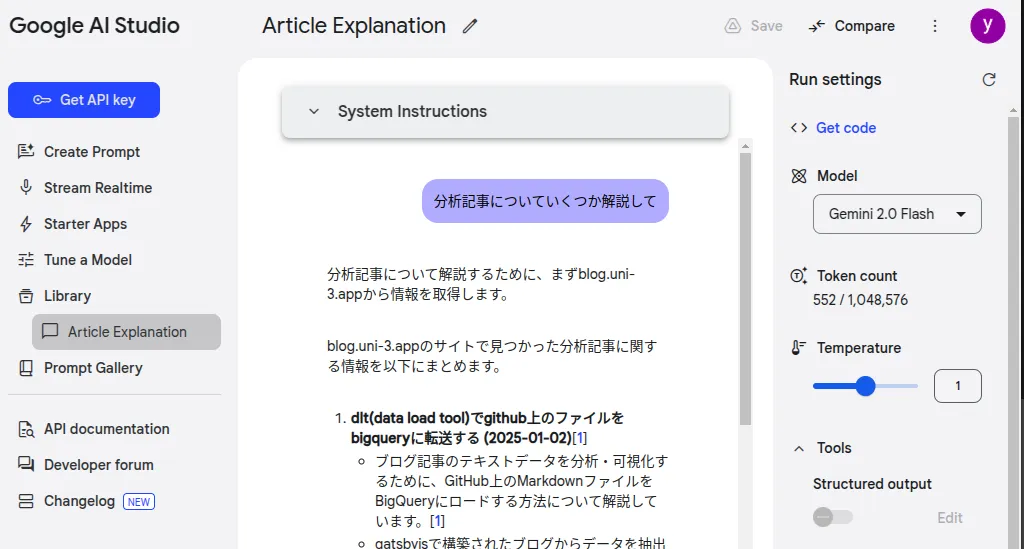
また、モデルや、パラメータ、system promptを設定しての試行錯誤はGoogle AI Studioの画面から行うことができる。右サイドバーの下の方からGrounding with Google Searchを有効化ができる
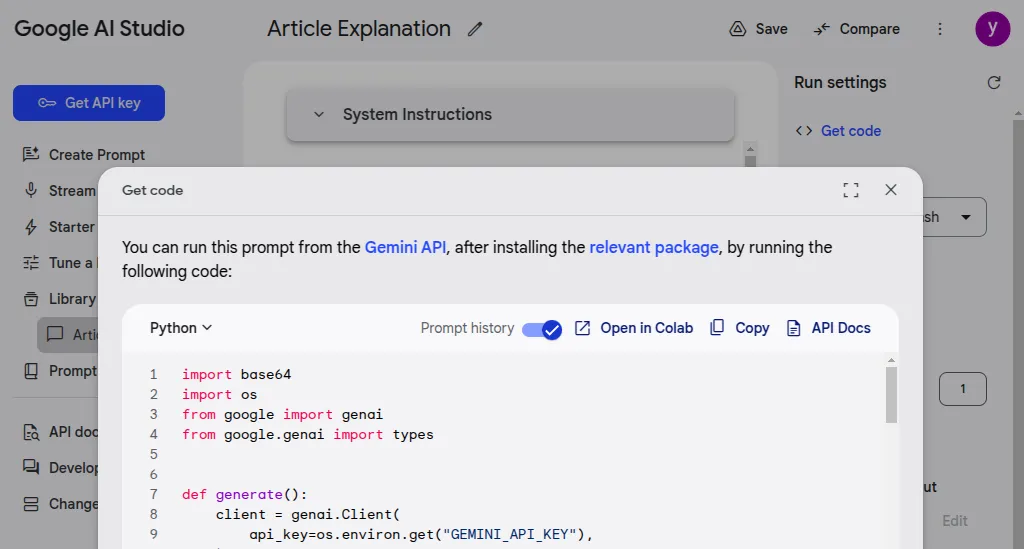
また、Get codeをクリックすると各種設定値を反映した状態のコードが取得できて便利
cloudflare functions
本題ではないが、使ったのでメモ
もともとgatsbyjsをcloudflare pagesでホスティングしており、手軽にAPI追加できそうだったため利用した。blogのリポジトリのルート、functionsディレクトリ以下に指定された形式の関数で作成すると、deploy時に自動的に作成される。APIのパスはfunctions以下のディレクトリ構成を反映したもの(ファイルベースルーティング)となる
pagesの設定にて、API_KEYの環境変数を設定して、あとはリポジトリにコードをpushすれば使えるようになった
参考
https://developers.cloudflare.com/pages/functions/get-started/
感想
google検索によるgroundingはSDKで対応していることもあり、実装自体は簡単にできた。が、サイト内検索で用いるにはソースの範囲が広かった。何回か検索すると対象サイト以外も回答しちゃうので難しい
出力に制限かけるのは難しいし、特定の範囲の情報を使って回答させたい場合はソースデータを絞るのが一番よさそう
また、vertex aiの機能にwebサイトのコンテンツをストアして、groundingに用いることができるらしいが課金が怖いのでやめておいた
https://cloud.google.com/vertex-ai/generative-ai/docs/grounding/overview?hl=ja#ground-private
軽く料金表をみてみたが、課金ポイントがありすぎてクラクラしてくる
https://cloud.google.com/generative-ai-app-builder/pricing?hl=ja
こういう検索機能を世間ではAI searchというっぽい。AIによる回答がメインの場合はそうなるのかな。厳密な定義までは辿れなかったのでどういう名称があってるかは不明
他の方法としてはembeddingを使ったベクトル検索を用いる、MCPでソース取得、関連記事を返すみたいなのもありうる。RAGを作って検索するよりかはストレージの管理がなくなるため仕組み上楽である。MCPがもっと普及したら、toolとして分離してstep by stepで出力させるほうが見通しよくなるか