stliteしてみたかった。今回はpdf viewer+pdfからテキストを出力するアプリをつくってみた。デプロイ先はgithub pagesにした
概要
pythonをブラウザで動かすツールについて。pyodideというのがpythonスクリプトをブラウザで動かす、代表的なツール(ディストリビューション)らしい
https://pyodide.org/en/stable/project/about.html
ブラウザで動く、すなわちgithub pagesなど静的サイトをホスティングするサービスで動作させることができる
pyodideを利用してstreamlitを使えるようにしたものがstlite。こちらを使うことにより、例えばstreamlitで作ったアプリを(.pyファイルをほぼそのまま)載せ替えてやることで、それなりの規模のアクセス数であっても耐えられるようにサクッとつくりかえる、ようなことも実現できる
stliteのリポジトリ、結構丁寧にコード例があったりして良い感じ
https://github.com/whitphx/stlite
他に利用可能なパッケージはこちらを参照。pandasやnetworkもある。標準的なML用途のパッケージも扱えるので集計・分析周りは便利そうではある
https://pyodide.org/en/stable/usage/packages-in-pyodide.html
環境
- node: 22.x
- stlite: 0.85.1
実装
リポジトリとpagesはこちら
https://github.com/uni-3/stlite-file-converter
https://uni-3.github.io/stlite-file-converter
以下、ちょっと抜粋
markitdown-no-magika
抽出にはmarkitdownを使っているが、このパッケージではmagikaというファイルタイプ検出のpythonパッケージに依存しないよう。こちらのissueによるとメモリを喰うため忌避されているとのこと
https://github.com/microsoft/markitdown/issues/1234
基本の使い方
pdf変換周りはほぼパッケージに任せなのでhello world的なコードにて構成のイメージだけ載せておく
- index.html
stliteはscriptタグからimportして利用できる
<!DOCTYPE html>
<html>
<head>
<meta charset="UTF-8" />
<meta
name="viewport"
content="width=device-width, initial-scale=1, shrink-to-fit=no"
/>
<title>Stlite file converter</title>
<link
rel="stylesheet"
href="https://cdn.jsdelivr.net/npm/@stlite/browser@0.85.1/build/stlite.css"
/>
</head>
<body>
<div id="root"></div>
<script type="module">
import { mount } from "https://cdn.jsdelivr.net/npm/@stlite/browser@0.85.1/build/stlite.js";
mount(
{
requirements: ["markitdown-no-magika", "pandas", "tabulate"],
entrypoint: "streamlit_app.py",
files: {
"streamlit_app.py": {
url: "streamlit_app.py",
},
"requirements.txt": {
url: "requirements.txt",
},
},
},
document.getElementById("root")
);
</script>
</body>
</html>- streamlit_app.py
中身はまんまstreamlitのコード
import streamlit as st
st.title("Hello stlite!")
st.write("This is a Streamlit app running entirely in your browser.")
name = st.text_input("What is your name?", "World")
st.write(f"Hello, {name}!")
if st.button("Click me!"):
st.balloons()
st.success("You clicked the button!")画面
実装した画面。pdf viewerがリッチすぎて、テキストやコメントを入れたりダウンロードもできたりする。もはや編集ツールとして使えそう
手元にあったpysparkのチートシートをあげてみている
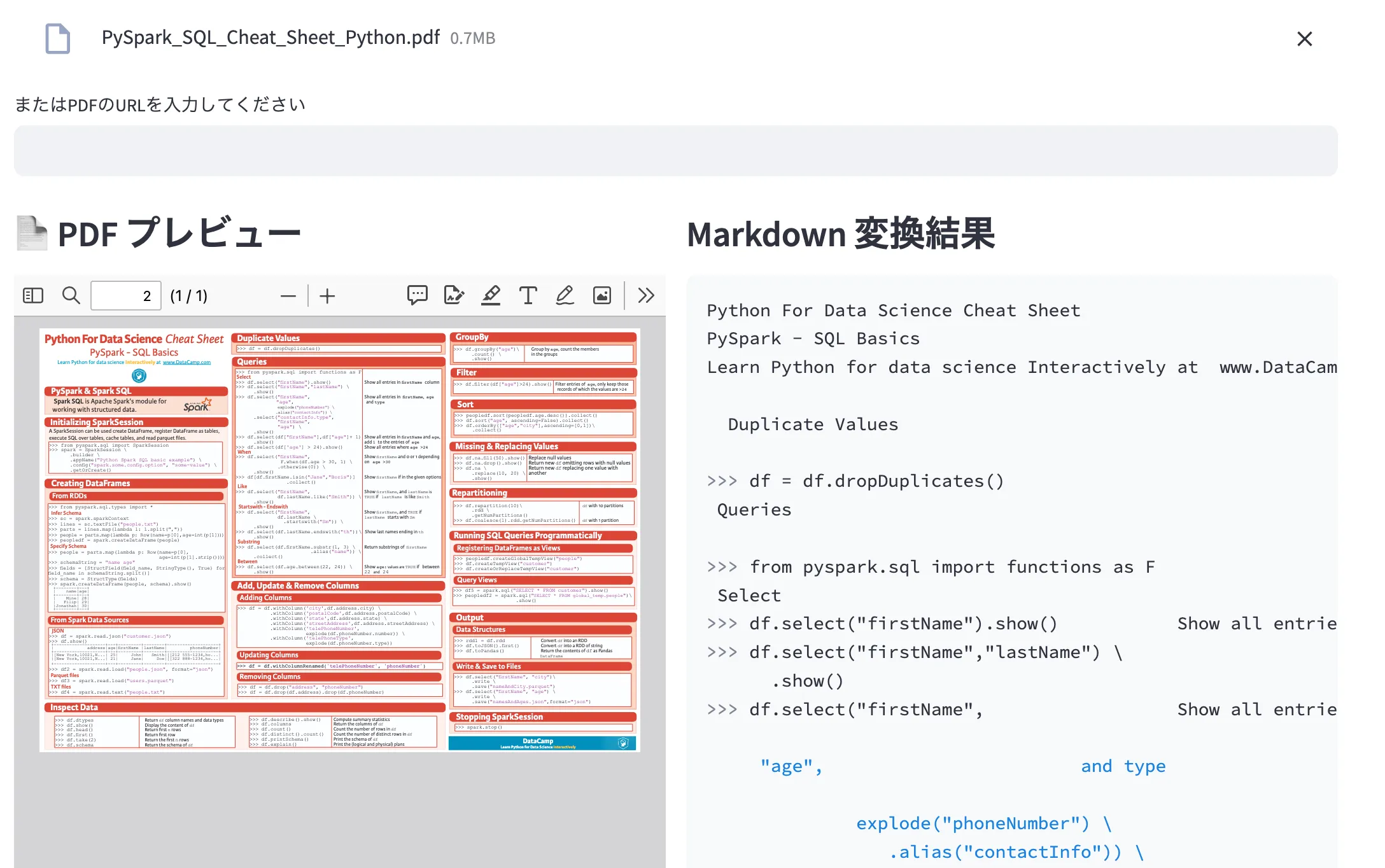
markitdownなのでテキスト抜き出しているだけ、な感じもあるが、ブラウザ上でpdfからテキストが簡単に抜き出せるツールを簡単に作れた
markitdown使ってるので、他形式ファイルの変換もできるかもしれない